Say it.
Your PC listens.
SayPower lets Alexa turn your Windows computer on and off. Install it, connect your Amazon account, and just say it. No router settings, no extra hardware.
72-hour free trial, then $10.99 per year.
Everything a power button should do.
By voice.
SayPower does one thing and does it well: it puts your computer's power under Alexa's control.
Turn on
Your Echo sends a wake-up signal to the computer over your home network (Wake-on-LAN).
Shut down, sleep or hibernate
You choose what “turn off” does. Change it any time in the SayPower window.
Up to 5 computers
Office, living room, gaming PC. Each one gets its own name in Alexa.
Knows if it's on
The Alexa app shows whether the computer is on or off.
No open ports
Nothing changes in your router. The computer keeps one secure outgoing connection.
Leaves nothing behind
Uninstall from Windows Settings, and SayPower removes its service, files and settings from the computer.
Just say it.
Pick a name for your computer, ask Alexa to discover devices, and it works with the words you already use. You can also add it to your Alexa routines.
Ready in a few minutes
No accounts to create on our side and no settings to type in.
Install
Run SayPower on the computer. It checks the computer and sets up the network card for wake-up.
Connect
Sign in with the same Amazon account as your Alexa app and check that the codes match.
Say it
Enable the SayPower skill in the Alexa app, say “Alexa, discover devices”, and you're done.
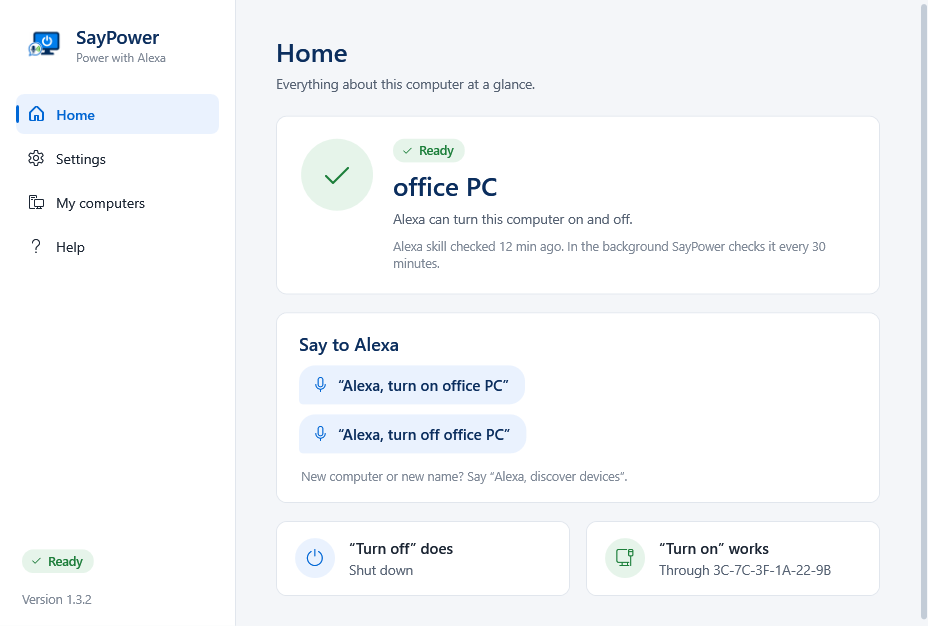
Clear, light and friendly
One small window shows whether everything is ready, what to say, and which computers are in your account.
Requirements
- Windows 10 or 11. The installer helps you get Microsoft .NET Runtime 10 if it is missing.
- An Alexa app and an Amazon account (English, United States).
- For turning on: an Echo device on the same home network, and a computer connected by network cable.
- Wake-on-LAN support in the computer. Waking a fully shut-down computer also depends on its BIOS.
$10.99 / year
Before VAT / sales tax. Up to 5 computers. All features.
Free trial: 72 hours from connecting your first computer. 14-day refund, no questions asked (Refund Policy).
Questions
Do I need to open ports or change my router?
No. The computer keeps one secure outgoing connection to the SayPower service. Turning on uses your Echo on the home network.
Turn off works, but turn on does not. Why?
Turning on needs a network cable, Wake-on-LAN enabled on the network card (the installer does this) and an Echo on the same network. Some computers also need a BIOS setting or Fast Startup turned off.
Windows shows a warning when I run the installer. Is that normal?
Yes. SayPower is not signed with a paid certificate, so Windows may show “Unknown publisher” or a SmartScreen warning. Download SayPower only from this website.
What does SayPower know about me?
Among other things: your Amazon account ID, the keys that let SayPower talk to Alexa, the names and network card addresses of your computers, a one-way fingerprint of each computer, and whether they are on. The computer's private key never leaves the computer. Details: Privacy Policy.
How does the free trial work?
You get 72 hours, counted from connecting your first computer, once per Amazon account. When it ends, Alexa can no longer control your computers until you subscribe; the SayPower program shows why.
How much does it cost?
US$10.99 per year, before VAT or sales tax, for up to 5 computers. The subscription renews every year until you cancel it. Payments are handled by our reseller Paddle.
Can I get my money back?
Yes. Ask within 14 days of a payment and you get a full refund, no questions asked. This also applies to yearly renewals. See the Refund Policy.
How do I install it?
Follow the step-by-step guide with pictures.
How do I remove it?
Windows Settings → Apps → SayPower → Uninstall. The service, files, settings and the computer's key are removed, and with an internet connection the computer is also removed from Alexa. Microsoft .NET Runtime stays unless you tick the box to remove it. Our service keeps your account record and its Alexa connection, so you can install again.